How Software Can Turn Repeated Human Decisions Into Workflows
A sales employee receives a new enquiry.
They check the customer's location.
Then they check the requested service.
They look at the customer's previous history.
They check whether the account already exists.
Then they forward the information to a manager.
The manager reviews it and decides whether the enquiry should go to the sales team, support team, or another department.
None of this is particularly difficult.
But it happens again.
And again.
And again.
After hundreds of repetitions, the business has a strange situation:
People are spending time making decisions that already follow a predictable pattern.
This is where software workflows can make a major difference.
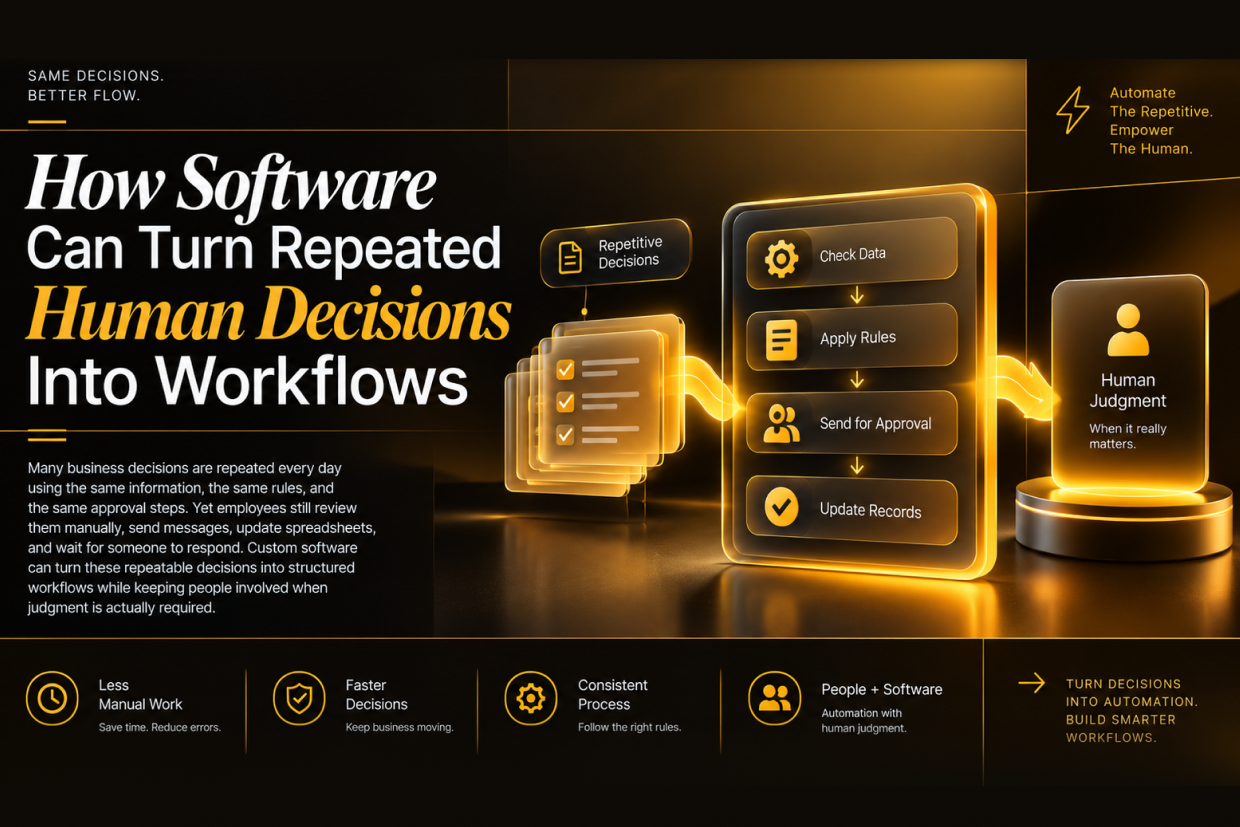
The goal is not to remove people from business processes. The goal is to let software handle the repeatable parts of a decision, while employees focus on situations that actually require experience, judgment, or exception handling.
Not Every Human Decision Needs Human Effort
Consider a simple purchase approval process.
An employee submits a request.
The company may already have rules such as:
- Purchases below a certain amount follow one approval path.
- Purchases above that amount require a manager.
- Certain categories need finance review.
- Emergency requests follow a different process.
- Missing information sends the request back to the employee.
These rules are already known.
Yet someone may still manually read the request, check the amount, identify the department, decide who should approve it, and send an email.
The employee is making a decision.
But often, they are not really thinking through a unique problem.
They are applying an established rule.
That distinction is important.
Software is particularly useful when the decision process is repetitive, predictable, and based on identifiable conditions.
From Individual Decisions to Business Rules
When a team repeatedly makes the same type of decision, the first step is to understand what actually determines the outcome.
Imagine a customer support team deciding how incoming tickets should be handled.
The process may look like this:
New Ticket → Check Category → Check Priority → Check Customer Type → Assign Team
A human agent may do all five steps manually.
A workflow system can handle the first four automatically and assign the ticket based on predefined rules.
The employee then receives a ticket that already has the relevant information attached.
Instead of deciding where the ticket should go, they can focus on how the customer's problem should be solved.
That is a much better use of human attention.
A Workflow Does Not Mean “No Human”
This is one of the most important distinctions.
Automation does not have to mean complete automation.
A well-designed business workflow can contain both automated and human steps.
| Process Step | Software Can Handle | Human May Handle |
|---|---|---|
| Collect information | Yes | Review when incomplete |
| Validate basic conditions | Yes | Handle unusual cases |
| Route the request | Yes | Override when necessary |
| Apply standard rules | Yes | Review exceptions |
| Approve routine requests | Sometimes | Required for higher-risk cases |
| Handle unusual situations | No | Yes |
This creates a human-in-the-loop workflow.
Routine cases move quickly.
Exceptions still reach experienced employees.
The Real Opportunity Is Hidden Inside Repetition
Businesses often identify automation opportunities by asking:
“Which task takes the most time?”
That is useful, but another question can be even more valuable:
“Which decision does our team make dozens or hundreds of times using almost the same logic?”
That can reveal workflow opportunities that are easy to overlook.
For example:
- A logistics company repeatedly decides which shipment should go through which process.
- A finance team repeatedly checks whether an expense falls within a policy.
- An HR team repeatedly routes employee requests to the correct department.
- A sales team repeatedly decides whether a lead should be assigned to inside sales, field sales, or follow-up.
- A property management team repeatedly checks whether a maintenance request should be treated as routine or urgent.
Different industries.
Similar pattern.
Known information → business rule → predictable action.
When a Spreadsheet Is Actually a Workflow in Disguise
Many businesses already have workflows.
They just do not call them workflows.
Instead, the process lives inside:
- Excel sheets
- WhatsApp messages
- Email threads
- Shared documents
- Printed forms
- Manual checklists
For example, a manager may maintain a spreadsheet with columns like:
Pending → Under Review → Approved → Rejected → Completed
Every morning, someone opens the file, checks each row, decides what needs to happen, and sends messages to the relevant employees.
The spreadsheet is storing the information.
But the actual workflow still depends on people remembering what to do next.
Software can connect the status to the action.
When a request moves to Approved, the next task can be created automatically.
When information is missing, the system can return it to the requester.
When a deadline approaches, the responsible employee can receive a reminder.
The workflow becomes part of the software instead of existing only in someone's memory.
Turning Rules Into Workflow Logic
Suppose a company has this policy:
Every new business lead with an expected project value above ₹5 lakh must be reviewed by a senior sales manager.
A traditional process might require an employee to notice the amount and manually forward the lead.
A workflow system can express the rule directly:
Lead Created → Check Estimated Value → Above ₹5 Lakh → Senior Review
The system does not need to “understand” the business in a human sense.
It only needs structured information and clearly defined rules.
This is why documenting business logic is often the first step before building automation.
The Hardest Part Is Often Not the Software
Businesses sometimes assume workflow automation means developing a dashboard and adding some buttons.
The difficult part is usually earlier.
You need to understand:
- What triggers the process?
- What information is available at that moment?
- Which conditions change the next step?
- Who is responsible for the decision?
- What happens when information is missing?
- What happens when the normal rule does not apply?
These questions expose the actual process.
Without them, software simply digitizes a confusing workflow.
And a confusing digital workflow is still confusing.
Bad Processes Can Be Automated Too
Automation is not automatically an improvement.
Imagine a company has a six-step approval process that exists only because different teams created overlapping checks over the years.
If software simply reproduces those six steps exactly, the company may end up with a very efficient way to perform unnecessary work.
This is why there should be a distinction between:
Automating a process
and
Improving a process before automating it.
A useful workflow project asks:
- Does this step still need to exist?
- Can two approvals become one?
- Can information be captured earlier?
- Can the system calculate something instead of asking an employee to calculate it?
- Which exceptions genuinely need human review?
The result should not simply be a digital version of the old process.
Decision Tables Can Make Complex Rules Easier to Understand
Some workflows involve several conditions.
Consider a customer service escalation process.
| Customer Type | Issue Priority | Response |
|---|---|---|
| Standard | Low | Normal support queue |
| Standard | High | Priority support |
| Enterprise | Low | Assigned account team |
| Enterprise | High | Immediate escalation |
A system can apply rules like these consistently.
The advantage is not just speed.
It is consistency.
Two employees should not produce completely different outcomes simply because they interpret the same policy differently.
Consistency Can Be More Valuable Than Speed
Businesses often think workflow automation is mainly about saving time.
Time savings matter.
But consistency can be equally important.
Suppose ten employees review similar requests.
One approves quickly.
Another asks for additional documentation.
Another follows an older policy.
Another forgets to escalate the case.
The business ends up with different outcomes for similar situations.
A structured workflow can establish a common baseline.
The same conditions trigger the same standard action.
Employees can still override the process when necessary, but there is now a defined default path.
The system becomes a source of process consistency.
What Happens to Exceptions?
This is where good workflow design differs from simplistic automation.
Real businesses contain exceptions.
A customer may have unusual requirements.
A supplier may have a special agreement.
A transaction may look normal but require investigation.
A request may fall outside the approved policy.
The solution is not to force every situation through the same automated path.
Instead, software can identify cases that do not match the standard rules.
For example:
Routine Case → Automatic Processing
Unusual Case → Human Review
This keeps automation focused on the predictable majority while protecting the business from blind automation.
Workflow History Becomes Valuable Data
Manual processes often make it difficult to understand why a decision happened.
Someone may say:
“I approved it because the manager told me to.”
Another person may remember it differently.
A software workflow can record:
- Who submitted the request
- When it was submitted
- Which rule was applied
- Who reviewed it
- What was changed
- When it was approved
- Why it was rejected
- When the next step was triggered
This creates an operational history.
Over time, that history can reveal more than the original workflow.
It can show where requests are getting delayed, which rules create the most exceptions, and which approval stages generate unnecessary effort.
A Workflow Can Keep Improving After It Goes Live
The first version of a workflow does not need to be perfect.
Once the process becomes measurable, the company can improve it.
Suppose the data shows:
70% of requests follow the same path.
That suggests an opportunity for deeper automation.
Or perhaps:
25% of requests are returned because required information is missing.
That points to a form or validation problem.
Maybe:
Most delays happen at one approval stage.
The solution may involve changing the approval rule rather than adding more automation.
Software turns the process into something the business can observe and improve.
Where Workflow Automation Works Best
The strongest candidates usually have a few characteristics.
- The process happens frequently.
- The inputs are reasonably structured.
- The decision follows known rules.
- The outcome can be clearly defined.
- Exceptions can be identified.
- The process has a measurable business result.
Examples include approvals, assignments, validations, notifications, status transitions, scheduled follow-ups, document checks, and internal routing.
Processes based heavily on negotiation, creativity, or unpredictable judgment usually require more human involvement.
The goal is not maximum automation.
The goal is appropriate automation.
A Practical Workflow Transformation
Imagine a company currently handles employee expense claims through email.
An employee sends a receipt.
Finance opens it.
They check the department.
They verify the amount.
They compare it with the expense policy.
They ask for missing information.
They forward it to the manager.
The manager approves it.
Finance updates a spreadsheet.
An improved workflow might look like:
Employee Submits Claim
↓
System Validates Required Information
↓
Policy Rules Are Checked
↓
Routine Claim → Automatic Routing
↓
Exception → Finance Review
↓
Manager Approval Where Required
↓
Finance Processing
↓
Employee Receives Status Update
The business has not eliminated the finance team.
It has removed repetitive coordination work around the finance team.
That distinction is where much of the value comes from.
Before Building the Workflow, Map the Decision
One practical approach is to document the process in plain language before writing any software.
For each repeated decision, identify:
- Trigger — What starts the process?
- Inputs — What information is available?
- Rules — Which conditions change the next step?
- Action — What should happen?
- Owner — Who is responsible?
- Exception — When should the normal process stop?
- Outcome — What does completion look like?
Once these are clear, the software architecture becomes much easier to define.
Software Should Make Employees Better at Their Jobs
The best workflow automation does not make employees feel like they have been replaced by a machine.
It removes the repetitive coordination around their work.
A support manager should spend more time resolving difficult customer issues, not assigning tickets manually.
A finance professional should spend more time investigating unusual transactions, not checking whether every form contains a department code.
An HR manager should spend more time handling sensitive employee situations, not sending routine reminders.
A sales manager should spend more time coaching the team, not moving leads between spreadsheets.
Automation should move human attention toward work that benefits from human judgment.
The Future of Business Software Is More Than Storing Information
Traditional software often answers:
“Where is the data?”
Modern workflow software can answer another question:
“What should happen next?”
That is a significant shift.
The system does not just store a customer request.
It can route it.
It does not just record an approval.
It can trigger the next step.
It does not just show a pending task.
It can remind the responsible person.
It does not just store a rule in documentation.
It can apply that rule consistently.
This is how software becomes part of the business process rather than simply a place where employees enter information.
Start With the Decisions You Repeat Most
Businesses do not need to automate everything at once.
A better starting point is to look for one repeated decision that consumes significant employee time and follows reasonably clear rules.
Document how it works today.
Identify unnecessary steps.
Separate routine cases from exceptions.
Then build a workflow around the improved process.
Once the system is working, the business can measure the result and identify the next opportunity.
The best automation projects often begin with one simple question:
“Why are our employees still making this same decision manually every day?”
When the answer is a set of repeatable rules, software may be able to handle much of that work automatically.
At Vriksha Techno Solutions, custom software can be designed around the way a business actually operates—not just around generic software features. The objective is to turn repeated processes, approvals, routing decisions, and business rules into practical workflows that reduce repetitive effort while keeping people in control where human judgment matters.
Ready to Build Your Next Digital Product?
Our experts will respond within 24 hours with a tailored approach for your project.