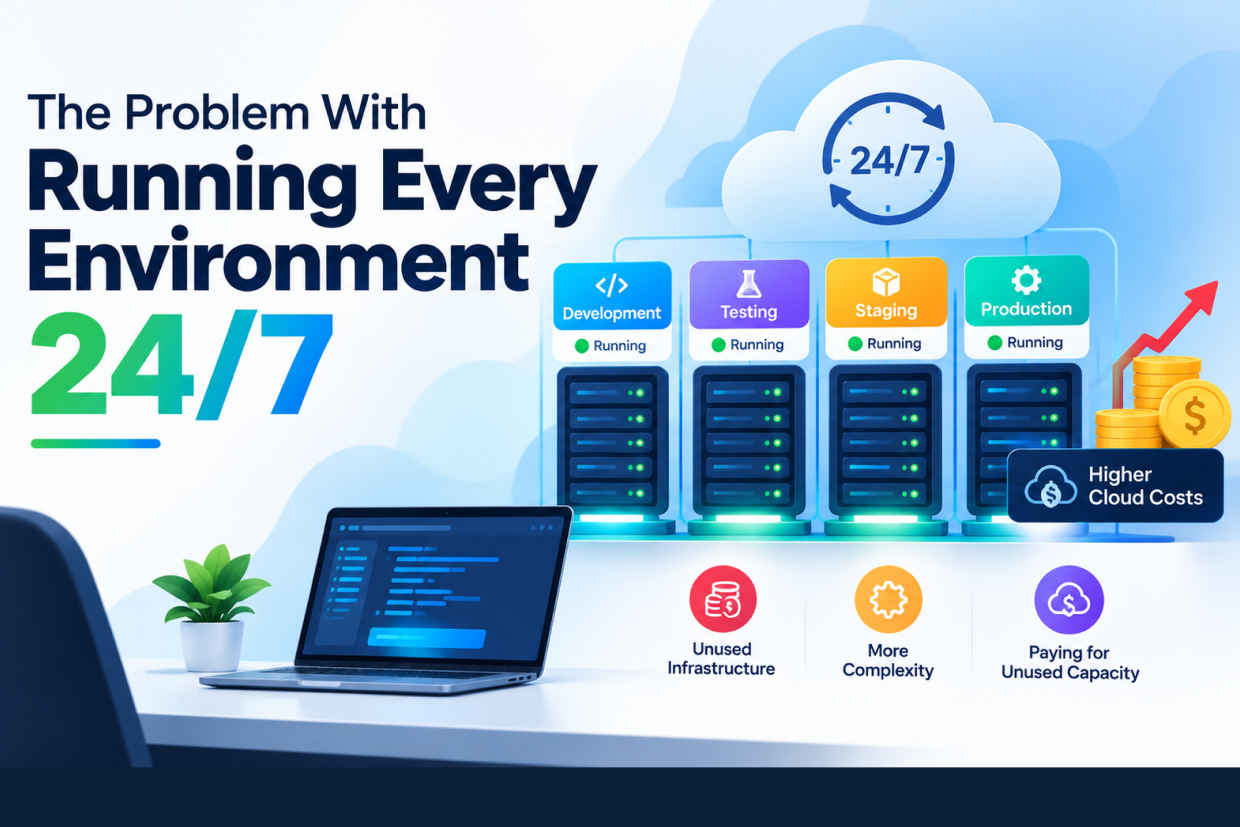
The Problem With Running Every Environment 24/7
A development team has a cloud account with several environments.
There is a development environment for the engineering team. There is a testing environment for QA. There is a staging environment that mirrors production. There may also be environments for product demonstrations, internal testing, feature branches, client reviews, and temporary projects.
Everything is available.
The servers are running.
The databases are active.
The containers are online.
Monitoring is enabled.
Storage is attached.
The team likes the convenience.
Nobody needs to wait for an environment to start before beginning work.
It sounds efficient.
Then the monthly cloud bill arrives.
The production system is responsible for an important part of the cost, but the rest of the infrastructure is surprisingly expensive too.
Someone starts investigating.
The team discovers that several development environments have been running all weekend.
A testing server has been online overnight for months.
A staging database is running even when nobody is using staging.
A temporary environment created for an old feature is still active.
The infrastructure is not broken.
Nothing is crashing.
There is no obvious outage.
The problem is much simpler:
The business is paying continuously for environments that are only needed occasionally.
This is one of the less obvious areas of cloud cost management.
Businesses often focus on production optimization because production serves customers directly. Non-production infrastructure can receive much less attention because it is considered temporary or secondary.
But when development, testing, staging, and other environments remain active 24/7, temporary infrastructure can quietly become permanent spending.
Why “Always Available” Feels Like the Safe Choice
Keeping every environment online has an obvious advantage.
A developer can start working immediately.
A tester can open the application without waiting.
A product manager can review staging at any time.
A client demonstration environment is already available.
A scheduled job does not need to start a server first.
From a workflow perspective, this can feel convenient.
That convenience is one reason always-on infrastructure is so common.
The problem is that convenience has a price.
An environment does not need to be actively serving a customer to consume cloud resources. Compute instances may continue running. Databases may continue using capacity. Load balancers, disks, public IPs, managed services, logs, and other components may continue generating charges.
A team may think:
“We are not using the server right now.”
The cloud provider may effectively be saying:
“The server is still allocated, so the cost continues.”
That difference between resource availability and resource usage is where much of the problem begins.
Production and Non-Production Do Not Have the Same Requirements
One reason businesses end up with oversized non-production infrastructure is that teams copy production too closely.
Suppose production runs with several application instances, a large database, background workers, caching infrastructure, monitoring services, and multiple supporting systems.
The company then creates a staging environment.
Instead of asking what staging actually needs, the team duplicates the production architecture.
The result may be useful for certain tests, but the environment could remain far larger than necessary for most of the day.
Production may require continuous availability because customers depend on it.
Development usually does not.
Testing often does not.
A temporary review environment almost certainly does not.
That does not mean non-production environments should always be tiny.
It means their requirements should be based on their actual purpose, not copied automatically from production.
The Hidden Cost Is Not Only Compute
When businesses hear about idle cloud resources, they often think about virtual machines.
But a complete environment can contain many other resources.
A development environment might include application servers, databases, object storage, load balancers, container infrastructure, monitoring services, queues, caches, IP addresses, backup storage, and third-party services.
Some of those resources may continue running even when nobody is actively working.
For example, a development database may contain very little traffic but still run with provisioned capacity.
A load balancer may remain active despite having almost no requests.
A managed database may continue operating overnight even though the team only uses it during working hours.
An environment that appears quiet can still generate a meaningful bill.
The Real Problem Is Often Utilization
Consider a simple environment used by a team during working hours.
Suppose it is actively needed for roughly eight or nine hours per weekday.
The infrastructure remains online for the remaining hours.
The organization is essentially paying for availability during periods when nobody needs it.
A useful way to think about this is:
Provisioned Time ≠ Productive Time
The environment may exist for 24 hours, but the business may only receive meaningful development value from it for part of that period.
| Environment | Typical Usage Pattern | Optimization Question |
|---|---|---|
| Development | Mainly during working hours | Can it stop outside working hours? |
| QA | Used during test cycles | Can it start when testing begins? |
| Staging | Used for releases and reviews | Does it need to run continuously? |
| Demo | Used for specific meetings | Can it be started only when required? |
| Temporary branch environment | Used during feature development | Can it expire automatically? |
| Production | Customer-facing | What availability is actually required? |
The correct answer will differ by business.
The important thing is to ask the question.
Development Environments Are Particularly Easy to Leave Running
Development environments are often created for speed.
A developer needs a database, so one is created.
A project needs a server, so another is launched.
A new branch needs an isolated environment, so a copy is created.
At the beginning, each environment has a clear reason.
Months later, the number of resources can grow.
Some developers leave environments running because they expect to use them tomorrow.
Someone goes on leave.
A project is paused.
A feature is cancelled.
The environment remains active.
Over time, the cloud account can contain infrastructure that nobody remembers creating.
This creates a second problem beyond cost:
Ownership becomes unclear.
The Environment Nobody Owns
Imagine a cloud account contains fifteen development servers.
The team knows who owns five of them.
Another three belong to active projects.
Nobody knows who created the remaining seven.
This is a common operational warning sign.
An environment without a clear owner is difficult to manage because nobody is responsible for deciding whether it should remain active.
A simple ownership model can make a significant difference.
Each environment should have information such as its project, owner, purpose, creation date, expected end date, and whether it is allowed to run continuously.
Without that information, temporary infrastructure tends to become permanent by default.
Temporary Environments Often Become Permanent
One of the easiest ways to increase infrastructure waste is to create an environment for a temporary need and never define when it should disappear.
A developer creates a test environment for a new feature.
The feature is completed.
The environment remains because there is always a possibility that someone may need it again.
A month later, nobody remembers whether it is still required.
Six months later, the environment is still running.
The issue is not that temporary environments are bad.
Temporary environments are extremely useful.
The issue is:
Temporary infrastructure needs an expiration strategy.
An environment that has no expiry date is often not truly temporary.
Staging Is Not Automatically Required 24/7
Staging environments are especially interesting because teams often assume they must remain online continuously.
For some organizations, that may be necessary.
For others, staging is mainly used before releases, during QA cycles, during stakeholder reviews, or for specific integration tests.
If staging is only heavily used during particular periods, keeping the entire infrastructure continuously active may not be the most efficient approach.
A team can instead ask:
When does staging actually need to be available?
The answer might be during business hours.
It might be around deployment windows.
It might be when a release candidate is being tested.
It might need to remain available for external users.
There is no universal schedule.
The infrastructure schedule should follow the business workflow.
Automatic Start and Stop Can Change the Equation
One of the simplest strategies for non-production infrastructure is scheduled operation.
A development environment can start in the morning and stop in the evening.
A QA environment can start when the team begins testing.
A staging environment can remain available during planned review periods.
This does not require developers to remember every day.
The infrastructure can follow an automated schedule.
The exact implementation depends on the cloud platform and architecture, but the underlying principle is simple:
Do not make humans responsible for remembering repetitive infrastructure operations.
Automation can handle the predictable part.
But Scheduling Everything Off Can Also Create Problems
Cost optimization should not become blind shutdown.
Suppose a scheduled shutdown stops an environment while:
- A long-running test is executing.
- A database migration is running.
- A deployment is in progress.
- A client is reviewing the application.
- A scheduled integration test is waiting for the environment.
The result can be more frustration than savings.
That is why a useful strategy needs to include exceptions.
For example, an environment could normally shut down at a specific time but remain active when a deployment or test job has explicitly marked it as needed.
Good automation understands business activity rather than simply following a clock.
Development Teams Need Fast Access
One concern engineers may have is:
“What happens when I need the environment immediately?”
If starting an environment takes too long, developers may resist scheduled shutdowns.
This is where infrastructure design matters.
An environment should ideally be capable of starting quickly and predictably.
The team can use automated provisioning, infrastructure-as-code, preconfigured images, containerized services, or other mechanisms appropriate to the stack.
The objective is not simply to turn infrastructure off.
It is to make starting and stopping infrastructure a normal part of the workflow.
When developers can start an environment in a few minutes without manual intervention, keeping everything online permanently becomes much less necessary.
Not Every Resource Can Be Treated the Same Way
A common mistake is to think of an environment as one switch.
Real environments are collections of services.
An application server may be easy to stop.
A database may require additional planning.
Persistent storage may need to remain available.
Certain managed services may have different pricing behavior.
External integrations may depend on fixed endpoints.
Background jobs may require state management.
Because of this, optimization needs to consider the architecture as a whole.
For example, shutting down an application server while leaving an expensive database running may reduce some cost but not solve the larger problem.
Likewise, stopping a database without understanding persistent data requirements can create operational risk.
Cost optimization should follow dependency relationships, not isolated resources.
Idle Does Not Always Mean Unnecessary
Another important distinction is between low activity and no business value.
An environment may have low traffic but still be required.
A staging environment may be quiet because the team is not currently releasing anything.
That does not mean it should be deleted.
A development database may have low activity during the day because most work happens locally, but the team may still need it for integration testing.
Therefore, utilization data should support the decision.
Do not look only at whether a resource is busy.
Look at:
- Who needs it?
- When is it needed?
- What happens if it is unavailable?
- How quickly can it be recreated?
- What does it cost while idle?
These questions produce better decisions than simply shutting down anything with low traffic.
The Cloud Bill Can Hide the Pattern
Cloud billing dashboards often show total costs by service.
That number can tell a company that spending is increasing.
It does not always explain why.
A useful cost review should connect spending with environments.
For example, a business may discover that a significant percentage of its non-production costs come from a small group of resources that run continuously.
This information is more actionable than simply knowing that the monthly cloud bill increased.
Teams can then ask:
- Which environments are running continuously?
- Which have low usage?
- Which are temporary?
- Which belong to inactive projects?
- Which resources have no owner?
- Which services are expensive even when idle?
This creates a path from billing data to an actual infrastructure decision.
Tags and Ownership Can Make Cost Visible
Cloud environments become much easier to manage when resources are consistently identified.
Useful metadata can include project, environment, owner, team, cost center, creation date, and expiration date.
Imagine a resource appears in the cloud bill with:
Project: Customer Portal
Environment: Development
Owner: Engineering Team
Auto-Shutdown: Enabled
Expiry: None
That is already much more useful than an unidentified server.
Now imagine another resource has:
Project: Unknown
Environment: Unknown
Owner: Unknown
Created: 18 months ago
That resource deserves investigation.
The goal is not bureaucracy.
The goal is to make infrastructure understandable.
Environment Cost Should Be Part of the Development Process
Cloud cost is often reviewed after deployment.
A better approach is to consider cost when environments are created.
Before launching a new environment, teams can ask:
- What is this environment for?
- How long will it exist?
- Who owns it?
- Does it need production-level capacity?
- What hours does it actually need to run?
- Can it be started automatically?
- Can it be destroyed and recreated safely?
- What resources must persist?
These questions take little time compared with the amount of infrastructure waste they can prevent.
The Production Environment Should Be Different
Production infrastructure has a different responsibility.
Customers may depend on it.
Transactions may be occurring.
Monitoring may need to remain active.
Availability requirements may be strict.
For this reason, production should not be treated like a development environment.
The real opportunity is to examine non-production environments separately.
This distinction helps teams avoid making the mistake of applying aggressive cost controls to systems that genuinely require continuous availability.
A useful cloud strategy therefore asks two different questions:
How do we keep customer-facing systems reliable?
How do we avoid paying continuously for systems that do not need continuous availability?
Both are important, but the answers are different.
Feature Branch Environments Create Another Challenge
Modern development teams may create isolated environments for specific branches or features.
This can be extremely useful.
A developer can test a feature independently.
A designer can review a change.
A QA engineer can validate a branch without affecting another environment.
But if every branch creates permanent infrastructure, the number of environments can grow rapidly.
Imagine a team with twenty active branches.
If each branch receives its own application server, database, cache, and supporting services, the infrastructure footprint can become much larger than production itself.
This is where automated lifecycle management becomes valuable.
A branch environment can be created when needed and automatically removed after the branch is merged or closed.
The environment should follow the lifecycle of the work it exists to support.
Preview Environments Can Be Useful Without Becoming Permanent
A useful pattern for web applications is a temporary preview environment.
A developer pushes changes.
An environment is automatically created.
The team reviews the changes.
Testing is completed.
The environment is removed.
This creates a much closer relationship between infrastructure and development activity.
The important point is not the specific technology.
The important idea is:
Infrastructure can be created on demand instead of remaining available indefinitely.
That can reduce idle resources while preserving the ability to create isolated environments when they are actually needed.
There Is Also a Productivity Cost
Cloud cost is not the only issue.
Too many permanent environments can also create operational confusion.
Developers may not know which staging environment is current.
QA may test the wrong version.
An old environment may use outdated configuration.
A temporary environment may remain connected to a real service.
Monitoring may produce alerts from systems nobody actively owns.
DNS records can remain long after a project ends.
Credentials and secrets may remain associated with unused infrastructure.
In other words:
Unused infrastructure increases the number of things a team has to understand and maintain.
Reducing unnecessary environments can therefore improve operational clarity as well as cloud economics.
Always-On Infrastructure Can Create Security Exposure
An unused environment is still an environment.
If it has a public endpoint, authentication system, database, API, or application server, it may represent another surface that needs to be secured.
An old testing environment may contain outdated dependencies.
A forgotten server may not receive the same updates as production.
A temporary environment may use weaker configurations for convenience.
The longer these systems remain active, the greater the chance that somebody eventually forgets about them.
Reducing unnecessary infrastructure can therefore simplify the security landscape.
The goal is not to claim that every inactive environment is automatically insecure.
The point is that every running environment has an operational responsibility attached to it.
A Better Way to Think About Environment Lifecycle
Instead of treating environments as permanent infrastructure, businesses can treat them as resources with a lifecycle.
A useful lifecycle might be:
Create → Use → Pause → Resume → Review → Retire
For a long-lived environment, the lifecycle may be measured in years.
For a feature branch environment, it may be measured in days.
For a client demonstration, it may be measured in hours.
The important thing is that the lifecycle is intentional.
When infrastructure has no defined end state, it tends to remain active indefinitely.
A Practical Environment Policy
A company does not need a complicated policy.
Even a simple framework can make a difference.
| Environment | Availability Approach | Main Consideration |
|---|---|---|
| Production | Continuous where required | Customer availability |
| Development | Scheduled or on-demand | Developer working hours |
| QA | On-demand or scheduled | Test cycles |
| Staging | Based on release workflow | Review and deployment needs |
| Demo | On-demand | Meeting or presentation schedule |
| Feature branch | Temporary | Branch lifecycle |
| Experimental | Short-lived | Automatic expiry |
This is not a universal architecture.
It is a way of forcing the right question:
Does this environment actually need to be running right now?
Automation Works Best When It Is Observable
Automated shutdown sounds good until a developer wakes up to discover that their environment disappeared unexpectedly.
That is why the process should be visible.
Teams should know when an environment will shut down.
They should be able to request an extension.
They should receive appropriate notifications.
The environment should be easy to restart.
Logs should show when lifecycle actions happened.
This creates confidence.
People are more comfortable with automation when they can understand and control it.
Cost Optimization Should Not Become Developer Friction
A cloud cost strategy is successful only if teams can continue working efficiently.
Saving money by making developers wait thirty minutes every morning for infrastructure to become available may not be a good trade.
A better approach is to reduce idle time without introducing unnecessary friction.
For example, an environment could shut down automatically overnight and start before the team begins work.
A temporary environment could be created through a simple command or interface.
A staging environment could remain active during a planned review period and shut down afterward.
The objective is not:
“Turn everything off.”
The objective is:
“Make infrastructure available when it creates value.”
Measure Before and After
Cost optimization should be measurable.
Before changing environment schedules, teams can record current spending and utilization.
After introducing automated lifecycle management, compare:
- Infrastructure costs.
- Environment uptime.
- Start and stop frequency.
- Developer complaints.
- Deployment time.
- Testing time.
- Unexpected interruptions.
The goal is to understand whether the change produced a useful balance between cost and productivity.
A lower cloud bill is useful.
A lower cloud bill accompanied by broken workflows is not.
The Best Environment Is Not Always the Cheapest One
It is tempting to reduce everything aggressively.
But infrastructure has a business purpose.
A staging environment that costs money but catches production failures may provide significant value.
A dedicated test environment may support a critical release process.
A temporary demo environment may help a sales team close important deals.
The question should never be:
“Can we make this environment cheaper?”
A better question is:
“What level of infrastructure does this environment need to fulfill its purpose?”
Once that is known, the team can optimize around the requirement.
Cloud Efficiency Is About Matching Resources to Reality
The biggest lesson is not that 24/7 environments are always wrong.
They are not.
Some environments genuinely need continuous availability.
The problem is running every environment continuously without checking whether continuous availability is actually required.
A development server used eight hours a day should not automatically be treated like production.
A test environment used twice a week does not necessarily need to run every night.
A feature branch that existed for five days should not leave infrastructure running for six months.
A demonstration environment does not necessarily need to exist between demonstrations.
The infrastructure should reflect reality.
Run what you need, when you need it, for as long as you need it.
A Better Cloud Environment Strategy
Businesses can start with a relatively simple approach.
First, identify every non-production environment.
Then identify its owner and purpose.
Review how often each environment is actually used.
Measure which resources are consuming the most money.
Separate permanent infrastructure from temporary infrastructure.
Define appropriate shutdown or expiry rules.
Automate those rules.
Create an easy way to restart environments.
Monitor the effect on developers and testers.
Review the environment inventory regularly.
The important part is consistency.
A one-time cleanup can reduce the bill temporarily.
A lifecycle strategy prevents the same problem from returning.
The Problem Is Bigger Than an Unused Server
Running every environment 24/7 may look like a small infrastructure decision.
Over time, it can affect several areas of the business.
It can increase cloud spending.
It can create forgotten resources.
It can make ownership unclear.
It can increase security responsibilities.
It can complicate monitoring.
It can create configuration drift.
It can make cloud architecture harder to understand.
And it can encourage teams to think of infrastructure as something permanent even when the business process it supports is temporary.
This is why environment lifecycle management deserves more attention than it often receives.
The Goal Is Not to Keep the Cloud Empty
Cloud optimization is sometimes misunderstood as a race to remove resources.
That is not the objective.
The purpose of cloud infrastructure is to support the business.
A productive development environment is valuable.
A reliable staging environment is valuable.
A test environment that helps the team catch problems before production is valuable.
The problem begins when infrastructure remains active simply because nobody has created a better lifecycle for it.
Cloud efficiency is not about having fewer resources. It is about having the right resources available at the right time.
Make Infrastructure Follow the Work
A business does not operate every process continuously.
Developers have working hours.
QA teams have testing cycles.
Releases happen at specific times.
Client demonstrations happen on schedules.
Feature branches are eventually merged or closed.
Infrastructure can reflect those patterns.
When resources are created, used, paused, resumed, and retired according to actual business and engineering activity, the cloud becomes easier to manage.
The team spends less money on idle capacity.
Engineers spend less time cleaning up forgotten environments.
Security teams have fewer unnecessary systems to monitor.
And operations teams gain a clearer picture of what is actually running.
At Vriksha Techno Solutions, cloud and DevOps strategies can be designed around the actual lifecycle of an application's infrastructure. Development, testing, staging, and temporary environments can be planned with appropriate automation, monitoring, ownership, and lifecycle controls so that teams maintain the access they need without treating every environment as permanently active.
Ready to Build Your Next Digital Product?
Our experts will respond within 24 hours with a tailored approach for your project.