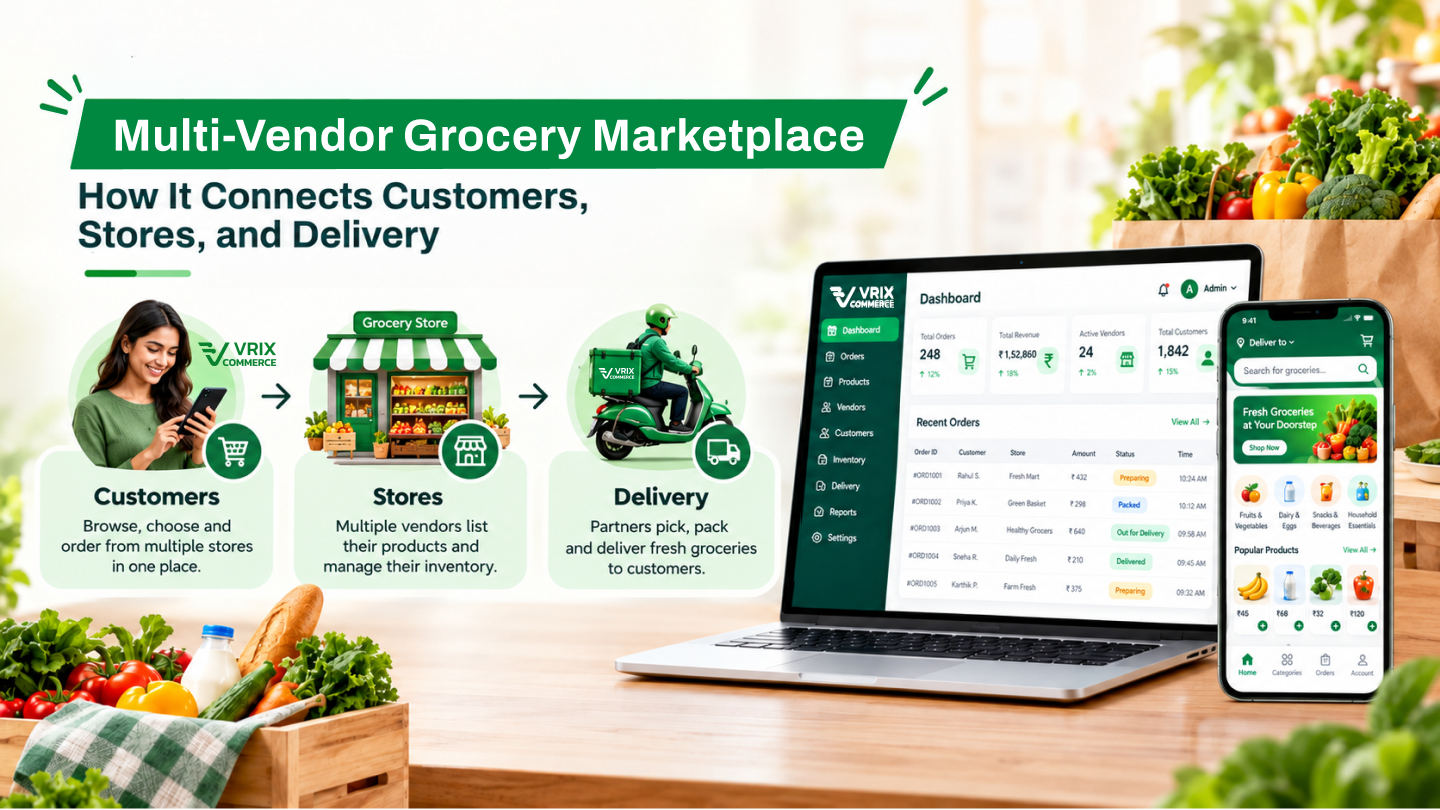
How It Connects Customers, Stores, and Delivery
Online grocery shopping has changed how customers purchase everyday essentials. Instead of visiting several stores, shoppers can browse available products, compare options, place orders, and choose convenient delivery or store pickup. For local grocery businesses, an online marketplace creates another way to reach customers and manage orders.
A multi-vendor grocery marketplace brings multiple grocery stores together on a shared digital platform. Customers can discover nearby stores and order products, sellers can manage their shops and inventory, delivery staff can handle assigned orders, and administrators can oversee marketplace operations from a centralized system.
What Is a Multi-Vendor Grocery Marketplace?
A multi-vendor grocery marketplace is an online platform where multiple independent grocery sellers list and sell products to customers through one website or connected application experience.
Unlike a single-store grocery website, a multi-vendor platform supports multiple shops, seller inventories, order workflows, and delivery arrangements. Customers can search for stores based on their location, browse available products, and purchase items from participating sellers.
The marketplace administrator manages the overall platform, including seller accounts, product catalogs, payments, commissions, delivery settings, and reporting.
How Does a Grocery Marketplace Work?
A typical grocery marketplace connects four main user groups: customers, sellers, delivery staff, and administrators. Each group has a dedicated set of features to support its responsibilities.
- Customers discover stores: Customers set their location or postal code to find available grocery shops in their service area.
- Sellers manage products: Store owners maintain product listings, inventory, operating hours, and delivery availability.
- Customers place orders: Shoppers select products, manage their cart, choose delivery or pickup, and complete checkout.
- Orders are processed: Sellers and delivery staff manage order requests according to the marketplace's configured workflow.
- Orders are fulfilled: Delivery staff handle accepted deliveries, or customers collect eligible orders from the store.
- Administrators monitor operations: Marketplace managers oversee orders, users, sellers, commissions, and business reports.
Key Features of a Multi-Vendor Grocery Marketplace
1. Location-Based Store Discovery
Location is important when customers shop for groceries online. A marketplace can use location detection or a customer-selected area to display stores that serve the requested location.
Customers can find shops by entering a postal code or service area and, where supported, choosing a search radius. Store listings can be limited to shops with available products, helping customers browse relevant options.
Location-based discovery can help connect nearby grocery stores with customers while supporting more practical delivery arrangements.
2. Product Catalog and Smart Shopping
A well-organized product catalog helps customers find the groceries they need without navigating an overwhelming list of items.
- Search products by keyword.
- Browse products by category or store.
- View product descriptions, brands, options, availability, and specifications.
- Explore related products and other sellers offering the same product.
- Filter and sort product listings.
- Save favorite products for later.
- View product ratings and reviews where available.
Marketplace administrators can manage shared product catalogs, categories, brands, and product options, while sellers maintain their own store inventory.
3. Multi-Vendor Cart and Flexible Checkout
Customers may want to purchase products from more than one grocery store during a single shopping session. A multi-vendor cart can support items from multiple sellers, with the platform grouping the resulting order details by seller.
The checkout process can include:
- Adding or selecting a delivery address.
- Reviewing and editing order details.
- Selecting an available payment method.
- Applying eligible coupons.
- Choosing delivery or store pickup.
- Selecting an available delivery date and time.
Flexible checkout gives customers options that suit their shopping preferences. Delivery charges, pickup availability, and free-shipping conditions can be configured according to marketplace and seller settings.
4. Customer Accounts and Order Management
A customer dashboard provides a central place to manage shopping activity. Depending on the platform configuration, customers can update their profile, manage saved addresses, view recent orders, access invoices, and review wallet credits or reward points.
Order management features may also support:
- Searching and filtering order history.
- Viewing order details and seller-specific suborders.
- Reordering previously purchased items.
- Submitting eligible cancellation or return requests.
- Checking request status.
- Contacting stores and exchanging messages.
- Reviewing products after completed deliveries.
These features help customers manage their purchases while giving the marketplace a structured process for handling order-related requests.
5. Seller Store and Inventory Management
Grocery sellers need tools to maintain their digital storefronts and handle incoming orders. A seller dashboard can bring essential store operations into one place.
- Manage store information, location, and return address.
- Configure opening days, business hours, packing time, and delivery slots.
- Manage products and store inventory.
- Update inventory using supported bulk-upload tools.
- Import or export catalog data where available.
- View orders and update order statuses.
- Handle cancellation and refund requests.
- Review sales, earnings, and product performance reports.
- Manage wallet transactions and withdrawal requests.
Seller subscription plans can also be used to structure marketplace access. For example, administrators may configure plans around product-upload limits and applicable commissions.
6. Delivery Staff and Order Fulfillment
Reliable order fulfillment is a core part of online grocery shopping. A marketplace can provide delivery staff with a dedicated web interface and mobile application for managing assigned orders.
Delivery workflows can include:
- Viewing incoming orders or seller-specific order requests.
- Accepting or rejecting eligible delivery requests.
- Viewing pickup and delivery locations on a map.
- Checking order details and delivery status.
- Managing current, upcoming, and completed orders.
- Viewing earnings, wallet balances, and transaction history.
- Submitting withdrawal requests.
Depending on the configured workflow, delivery fulfillment may be managed by the seller or by delivery staff. Clear order statuses and handoffs help each participant understand the next step.
7. Centralized Administration
As a marketplace grows, administrators need visibility into the people, products, orders, and financial settings that keep the platform operating.
An administration panel can provide tools to manage:
- Customer, seller, and delivery staff accounts.
- Stores, product catalogs, categories, brands, and inventory.
- Orders, subscriptions, cancellations, refunds, and withdrawals.
- Payment methods, currencies, taxes, and commission settings.
- Delivery charges and order-distribution settings.
- Discount coupons, promotional banners, and website content.
- Notifications, email templates, and order statuses.
- Administrative users and their permissions.
Centralized management gives the marketplace operator a consistent way to oversee seller activity and configure platform-wide rules.
8. Reports and Business Insights
Marketplace reporting helps administrators and sellers understand business activity and identify areas that may need attention.
Depending on the user's role, reports and dashboards can cover:
- Order counts and sales amounts.
- Seller sales and earnings.
- Product inventory and stock status.
- Product performance and popular products.
- Customer and seller registrations.
- Marketplace commissions and delivery charges.
- Refunded products and order outcomes.
- Website traffic and conversion statistics.
These insights help platform operators review performance and make informed decisions about catalog management, seller participation, and marketplace operations.
How Can a Grocery Marketplace Generate Revenue?
A multi-vendor grocery marketplace can support different revenue models. The right combination depends on the business strategy, seller agreements, and marketplace operating costs.
Commission on Orders
The marketplace can charge sellers a configured commission on qualifying orders. Commission rules should be clearly defined so sellers understand how their earnings are calculated.
Delivery Charges or Delivery Commission
The platform may collect delivery-related charges from customers according to its configured pricing model. The amount and calculation method should be transparent during checkout.
Seller Subscription Plans
Paid seller plans can provide access to marketplace listings under defined conditions, such as product-upload limits or different commission arrangements.
Paid Promotions and Banners
Grocery sellers may pay for promotional placements that increase the visibility of their stores or products within the marketplace.
These approaches can be combined, provided the platform clearly communicates applicable fees and subscription conditions.
Benefits of a Multi-Vendor Grocery Marketplace
- Convenient shopping: Customers can discover nearby stores and order groceries online.
- More seller visibility: Local grocery businesses gain an additional channel for showcasing products.
- Organized inventory management: Sellers can maintain their product listings and stock information through a dedicated dashboard.
- Flexible fulfillment: Configurable workflows can support delivery by sellers, delivery staff, or customer pickup.
- Structured order handling: Order statuses, seller-specific suborders, and request management help organize the purchasing process.
- Centralized oversight: Administrators can manage users, stores, commissions, content, and operational settings.
- Performance visibility: Sales, inventory, and marketplace reports help stakeholders review business activity.
What Should You Consider Before Building a Grocery Marketplace?
Choosing the right features is only one part of planning a successful marketplace. The operating model should also be defined before development begins.
Define the Service Area
Decide how customers will select their location, which stores can serve each area, and how delivery distances and service zones will be managed.
Choose the Order Fulfillment Model
Determine whether sellers handle their own deliveries, the marketplace assigns delivery staff, or both options are available. Define how order acceptance, pickup, delivery, and cancellation statuses work.
Plan Payments and Commissions
Document supported payment methods, seller commissions, delivery charges, refund rules, wallet transactions, and withdrawal procedures. The exact payment and settlement workflow should be confirmed during project planning.
Prepare Seller and Product Workflows
Establish how sellers register, manage stores, add products, update inventory, configure delivery slots, and process orders. Define how new catalog items are reviewed and approved.
Prioritize Mobile Usability
Customers and delivery staff may use the platform while shopping or completing deliveries. Make sure important tasks—such as searching products, checking orders, viewing maps, and updating delivery status—are straightforward on mobile devices.
Plan Notifications and Reporting
Identify which events require email, SMS, messaging, or push notifications. Decide which reports each role needs and ensure that access to customer, seller, and financial information follows appropriate permissions.
Build a More Connected Grocery Shopping Experience
A multi-vendor grocery marketplace brings customer shopping, local store management, delivery operations, and administration into a coordinated digital environment. With location-based store discovery, structured order workflows, inventory tools, flexible fulfillment, and reporting, businesses can establish a foundation for managing grocery commerce online.
The most effective solution is one that matches the marketplace's real operating model—from seller onboarding and product availability to checkout, order fulfillment, payments, and customer support.
Planning a grocery marketplace or upgrading an existing platform? Vriksha Tech can help you explore web and mobile application development options based on your business requirements.
Frequently Asked Questions
What is the difference between a single-vendor and a multi-vendor grocery platform?
A single-vendor platform serves one grocery business, while a multi-vendor marketplace brings multiple independent sellers together. A multi-vendor platform therefore needs to manage individual stores, seller inventories, seller-specific order details, and marketplace-wide settings.
Can customers order from multiple grocery stores in one cart?
A multi-vendor cart can support products from multiple sellers. The platform may organize the overall purchase into seller-specific suborders so each store can handle its part of the order.
Can a grocery marketplace support both delivery and store pickup?
Yes. A platform can be configured to offer delivery, store pickup, or both. Available options, delivery slots, and charges depend on the marketplace and seller settings.
How do grocery sellers manage their inventory?
Sellers can use a dashboard to manage products and inventory. Depending on the platform's capabilities, inventory may also be updated through supported bulk-upload tools such as CSV files.
How does a grocery marketplace make money?
Possible revenue sources include seller commissions, delivery-related charges, seller subscription plans, and paid promotional placements. The business should choose a model that fits its marketplace strategy and clearly disclose applicable fees.
Can delivery staff manage orders through a mobile application?
A delivery staff mobile app can support order acceptance or rejection, pickup and delivery details, map views, delivery status updates, and earnings information. The exact workflow depends on the configured application.
Ready to Build Your Next Digital Product?
Our experts will respond within 24 hours with a tailored approach for your project.